
Method summary
FPX
Checkout → bank → checkoutApprove on the bank’s own destination and keep the FPX and order references.
Start at the merchant checkout
The merchant presents FPX as a payment choice and offers a list of participating banks. You choose the bank account you intend to use. The checkout carries the amount and order context into the payment request; you do not normally construct an unrelated transfer by copying a recipient account number into another app.
Before continuing, understand the order or account action attached to the checkout. The same payment amount could relate to different orders. Capture the merchant’s order reference and amount so you can connect the bank result to the right purchase or account entry later. This website’s FPX article is an explanation, not a merchant checkout.
The handover to internet banking
The payment journey redirects your browser to the bank’s authentication flow. Your bank handles login and payment approval. PayNet’s consumer guidance explains that FPX uses the bank’s internet-banking authentication; merchant support should not ask you to send it a bank password or approval code.
A handover can open another page, tab or banking interface, depending on the implementation. Look at the actual address and the payment details. If the request differs from the amount or merchant you expected, do not approve just to make the page advance. Approval should relate to the payment you deliberately initiated.
Authentication and approval
A bank may require its usual additional authentication before authorising the payment. Follow the bank’s own prompt, including the stated amount and purpose. Merely signing in does not necessarily mean the payment has completed. Likewise, closing a banking page does not establish that an authorised payment was cancelled.
For an illustrative RM80 order, the checkout amount and bank payment amount should correspond. If a charge is disclosed separately, account for it rather than assuming every difference is an error. This example supplies no FPX fee or transaction limit: the current limits and conditions are those presented by the relevant participants.
Return to the payment journey
After the banking step, a result is sent through the FPX journey and the browser is returned to the merchant. The return page might show confirmation, a pending state or a failure. The browser page is part of the journey, but the transaction reference and recorded status are the evidence to preserve.
A connection can break after bank approval and before the merchant page loads. That means a blank return page cannot be used as proof of failure. The bank may have recorded a debit, and the merchant may need to reconcile its order status. The useful question is what happened to the original transaction, not whether clicking the checkout again produces a clearer screen.
Successful, pending and failed states
PayNet’s technical documentation distinguishes successful, pending authorisation, pending and other outcomes. Consumer interfaces may translate those states into their own wording. A pending state is unresolved; it does not justify treating the amount as available again or presuming the order is complete.
For a successful transaction that the merchant says it has not received, PayNet’s consumer FAQ directs the customer to provide the FPX transaction ID, merchant order number, amount and date/time to the merchant. That is a focused reconciliation query. A screenshot of only an account balance omits the details needed to identify the payment.
For a failed result accompanied by a bank debit, approach the bank about the original transaction and its handling. Do not promise yourself a particular refund deadline based on a generic article. Status codes and reversal handling are specific to the bank and transaction.
Build one record of the payment
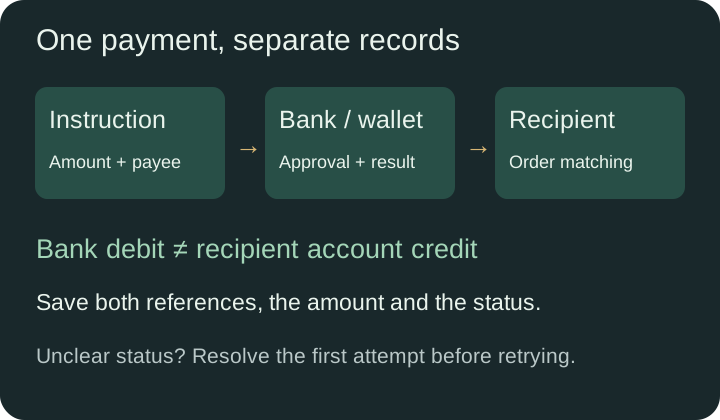
A useful record joins the merchant order number, FPX transaction ID, amount, date/time and bank status. Save the confirmation or receipt offered by the bank and the result displayed by the merchant. Keep the currency and timezone visible. A Malaysian timestamp can be labelled MYT, UTC+8, when the recipient uses a different clock.
If you contact support, describe the gap: for example, “Bank shows RM80 debited; order remains unpaid; original reference attached.” Redact unrelated transactions and full account details. Passwords, one-time codes and approval keys are not needed to identify an FPX transaction.
Common interruptions
A bank being unavailable, a session timing out, cancelled authentication or an interrupted return can prevent a clean checkout. First establish whether a debit exists and whether the bank lists the payment as completed, pending or failed. A generic error message on the merchant screen cannot answer both questions.
If there is no debit and the original attempt is definitively failed, a fresh attempt may be appropriate under the merchant’s instructions. If the state is unclear or there is a debit, resolve it first. Repeated checkout attempts can create several payment records and make the original problem harder to follow.
What FPX does not establish
FPX is a payment method, not a guarantee about a merchant’s goods, account decisions or withdrawal policy. Seeing it in a general guide does not mean this brand accepts it. Deposit and withdrawal choices are also separate: a checkout method does not automatically become a payout route.
Use the payment instructions and terms attached to the actual order. The payments hub compares this checkout flow with DuitNow, bank transfers and wallets so that the method name is connected to the journey you are really using.
Useful records
- Keep the merchant order number and FPX transaction ID together.
- An interrupted return page is not proof that the bank failed.
- Resolve an unclear debit before starting another checkout.
Questions about this topic
Is FPX the same as a manual bank transfer?
No. FPX begins at a merchant checkout, hands authentication to the chosen bank and returns a transaction result. A manual transfer starts from your own transfer instruction.
Who receives my bank login?
The bank authentication flow handles banking credentials. They do not belong in a merchant support message.
What if the bank debited me but checkout stayed unpaid?
Preserve the original FPX ID and order reference, then ask the merchant to reconcile them. Contact the bank about the debit if its status is failed or unclear.
References and further reading
PayNet: FPX consumer questions – primary payment-network information. Reviewed 8 October 2026.
PayNet: FPX browser handover and status – primary payment-network information. Reviewed 8 October 2026.
PayNet: FPX response codes – primary payment-network information. Reviewed 8 October 2026.